

Table of Contents
How to accept array input and print in Java using do-while loop
In this article, we will discuss the concept of How to accept array input and print in Java using do-while loop
In this post, we are going to learn how to write a program to read array input and print given elements in an array using do-while loop in Java language
Code to read input and print of array elements
Code to take input and print integer of an array using do-while loop
In this code, we are going to learn how to read integer array input given by user and print the them using do-while loop in Java language
Program 1
//Java program to read and print in an one dim array using dowhile
//Using do-whuile loop
import java.util.Scanner;
class Array_Sin_Dim_Int_Dowhile1{
public static void main (String args[]){
  Scanner scan=new Scanner(System.in);
//create a scanner instance for receives input
// from the user - input from keyboard
System.out.print("Enter the Array length: ");
//Ask input for array length
int len=scan.nextInt();
//Reading the user input for array length
int arr[]=new int[len];
//diclaration and creation of a array

System.out.println("Enter the array elements");
//Ask input from the user for array elements
int i=0;
do{
arr[i]=scan.nextInt();
//Reading input from the user for array elements
 i++;
}while(i<len);
//reading every array element
System.out.println("\narray elements are:");
i=0;
do{
System.out.println(arr[i]);
 i++;
}while(i<len);
  //display every array element
}
}
When the above code is executed, it produces the following result

Program 2
//Java program to read and print elements a one dimensional array
import java.util.Scanner;
class Array_Sin_Dim_Int_Dowhile2{
public static void main (String args[]){
  Scanner scan=new Scanner(System.in);
//create a scanner instance for receives input
// from the user - input from keyboard
System.out.print("Enter the Array length: ");
int len=scan.nextInt();
int arr[]=new int[len]; //diclaration and creation

System.out.println("Enter the array elements");
int i=0;
do{
System.out.print("[arr["+i+"]:");
arr[i]=scan.nextInt();
 i++;
}while(i<len);
System.out.println("\narray elements are:");
i=0;
do{
System.out.println("[arr["+i+"]:"+arr[i]);
 i++;
}while(i<len);
//display every array element
}
}
When the above code is executed, it produces the following result

Code to take input and print string of an array using do-while loop
In this code, we are going to learn how to read string array input given by user and print the them using do-while loop in Java language
Program 2
//Java program to read and print String an array using while
import java.util.Scanner;
class Array_Sin_Dim_String_DoWhile1{
public static void main (String args[]){
  Scanner scan=new Scanner(System.in);
//create a scanner instance for receives input
// from the user - input from keyboard
System.out.print("Enter the Array length: ");
//Ask input from the user for array length
int len=scan.nextInt();
//Reading the input from the user
String arr[]=new String[len];
//diclaration and creation of an array

System.out.println("Enter the "+len+" String");
int i=0;
do{
arr[i]=scan.next();
//Reding the input from the user
 i++;
}while(i<len);
System.out.println("\nEntered string are:");

int j=0;
do{
System.out.println(arr[j]);
j++;
//display every array element
}while(j<len);


}
}
When the above code is executed, it produces the following result

Program 2
//Java program to read and print String a array using do-while
import java.util.Scanner;
class Array_Sin_Dim_String_DoWhile_2{
public static void main (String args[]){
  Scanner scan=new Scanner(System.in);
//create a scanner instance for receives input
// from the user - input from keyboard
System.out.print("Enter the Array length: ");
//Ask input from the user for array length
int len=scan.nextInt();
//Reading the input from the user
String arr[]=new String[len];
//diclaration and creation of an array

System.out.println("Enter the "+len+" String");
int i=0;
do{
  System.out.print("[arr["+i+"]:");
arr[i]=scan.next();
//Reding the input from the user
 i++;
}while(i<len);
System.out.println("\nEntered string are:");
int j=0;
do{
System.out.println("[arr["+j+"]:"+arr[j]);
 j++;
}while(j<len);//display every array element
}
}
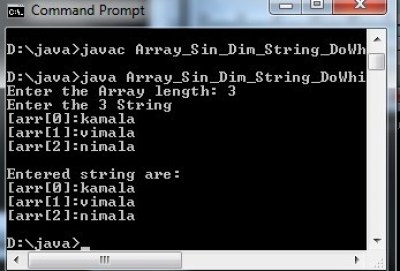
When the above code is executed, it produces the following result
Code to take input and print character of an array using do-while loop
In this code, we are going to learn how to read character array input given by user and print the them using do-while loop in Java language
Program 2
//Read and print character of an array using do-while loop
import java.util.Scanner;
class Arr_One_Dim_Char_DoWhile1{
public static void main (String args[]){
  Scanner sc=new Scanner(System.in);
//create a scanner object for Taking input
// from the user - input from keyboard
System.out.print("Enter the Array length: ");
//Ask input from the user for array length
int length=sc.nextInt();
//Reading the input from the user for array length
char arr[]=new char[length];
//diclaration and creation of char array

System.out.println("Enter the "+length+" Characters");
int i=0;
do{
arr[i]=sc.next().charAt(0);
//Reding the input(characters) from the user
 i++;
}while(i<length);
System.out.println("\nEntered characters are:");
int j=0;
do{
System.out.println(arr[j]);
 j++;
}while(j<length);
//display all entered characters
}
}
When the above code is executed, it produces the following result

Program 2
//Read and print character of an array using do-while loop
import java.util.Scanner;
class Arr_One_Dim_Char_DoWhile2{
public static void main (String args[]){
  Scanner sc=new Scanner(System.in);
//create a scanner object for Taking input
// from the user - input from keyboard
System.out.print("Enter the Array length: ");
//Ask input from the user for array length
int length=sc.nextInt();
//Reading the input from the user
char arr[]=new char[length];
//diclaration and creation of an array

System.out.println("Enter the "+length+" Characters");
int i=0;
do{
  System.out.print("[arr["+i+"]:");
arr[i]=sc.next().charAt(0);
//Reding the input(characters) from the user
 i++;
}while(i<length);
System.out.println("\nEntered characters are:");
int j=0;
do{
  System.out.print("[arr["+j+"]:");
System.out.println(arr[j]);
 j++;
}while(j<length);
//display all entered characters
}
}
When the above code is executed, it produces the following result

Suggested for you
Similar post
Java program to read and print array elements using for loop
Java program to read and print array elements using while loop
Java program to read and print array elements using Do-while loop
C code to read and print array elements using for loop
C code to read and print array elements using while loop
C code to read and print array elements using do-while loop
C++ program to read and print array elements using for loop
C++ program to read and print array elements using while loop
C++ program to read and print array elements using do-while loop