Table of Contents
Three Dimensional Array in java language
In this article, we will discuss the Three Dimensional Array in Java language
Basically, three-dimension array is array of 2d arrays
Before learning Three-dimensional array, you visit and understand in Java one dimension Array and two-dimension Array.
In that chapter, you learned to define ,create and use Three dimension array of primitive data types ( Double, int etc.), String array.

Declaration of the three-dimensional array
Syntex
Three dim array can declare following method
dataType[][][] arrayname; —— 1 or
dataType [][][]arrayname; ——- 2 or
dataType arrayname [][][]; —— 3
Example for Three dim array declaration
int [][][] array;

Creation of the three-dimensional array
Syntex
datatype[][][]arrayname=new datatype;
Example of Creation of Three-dimensional array
array=new int[3][3][3];

How to initialize a Three-dimensional array
Using staranded method
Program 1
array[0][0][0]=66;
array[0][0][1]=54;
array[0][0][2]=36;
array[0][1][0]=59;
array[0][1][1]=50;
array[0][1][2]=55;
array[1][0][0]=59;
array[1][1][0]=54;
array[1][1][1]=59;
Example
Program 1

When the above program is executed, it produces the following result
34
56
77
73
14
15
16
7
Program 2
Three dimension array – initialized standard method and separate elements from the array using Nested for loop

Retrieve element from Array using nested for loop
When the above program is executed, it produces the following result
346
586
747
673
104
125
156
207
Program 3
We can retrieve elements from Three dimension array using enhanced for loop

When the above program is executed, it produces the following result
346
586
747
673
104
125
156
207
Initialized array during the declaration
Code segment
int[][][] age={{45,34,67,65},
{23,76,58,72},
{15,65,68,90},
};
Program 1
class ArrayWithForThreeDim{
public static void main (String args[]){
int[][][] age={
  {
  {45,34,67},
{23,76,58},
{48,52,69},
  },
  {
{15,65,68},
{25,45,78},
{45,55,68},
  }
};

System.out.print("\ndisplay cell value in an array: \n");
for(int i=0; i<=1; i++){
   for(int j=0; j<=2; j++){
   for(int k=0; k<=2; k++){
      System.out.print("\ndisplay Element index["+i+"]["+j+"]["+k+"]: "+age[i][j][k] );
}
}
}
}
}
When the above program is executed, it produces the following result

Initializing and display elements using loops
Using for loop
import java.util.Scanner;
class ThreeDimArray{
public static void main(String args[]){
  int i,j,k;
Scanner scan=new Scanner(System.in);
int arr[][][]=new int[2][2][3];//array declaration
System.out.print("\nEnter the Element to three dim array: \n");
for(i=0; i<2; i++){
for(j=0; j<2; j++){
for(k=0; k<3; k++){
arr[i][j][k]=scan.nextInt();
}
}
}
System.out.print("\ndisplay Element in an array: \n");

for(i=0; i<2; i++){
for(j=0; j<2; j++){
for(k=0; k<3; k++){
System.out.print("\ndisplay Element["+i+"]["+j+"]["+k+"]:"+arr[i][j][k] );
}
 }
 }
}
 }
When the above program is executed, it produces the following result

Using while loop
import java.util.Scanner;
class ThreeDimArray1{
public static void main(String args[]){
  int i,j,k;
Scanner scan=new Scanner(System.in);
int arr[][][]=new int[2][2][3];//array declaration
System.out.print("\nEnter the Element to three dim array: \n");
i=0;
while(i<2){
j=0;
while(j<2){
k=0;
while(k<3){
arr[i][j][k]=scan.nextInt();
 k++;
}
 j++;
}
 i++;
}
System.out.print("\ndisplay Element in an array: \n");
i=0;
while(i<2){
j=0;
while(j<2){
k=0;
while(k<3){
System.out.print("\ndisplay Element["+i+"]["+j+"]["+k+"]:"+arr[i][j][k] );
 k++;
}
 j++;
 }
  i++;
 }
}
 }
When the above program is executed, it produces the following result

|Using do-while loop
class ThreeDimArray2{
public static void main(String args[]){
  int i,j,k;
Scanner scan=new Scanner(System.in);
int arr[][][]=new int[2][2][3];//array declaration
System.out.print("\nEnter the Element to three dim array: \n");
i=0;
do{
j=0;
do{
k=0;
do{
arr[i][j][k]=scan.nextInt();
 k++;
} while(k<3);
 j++;
} while(j<2);
 i++;
}while(i<2);
System.out.print("\ndisplay Element in an array: \n");
i=0;
do{
j=0;
do{
k=0;
do{
System.out.print("\ndisplay Element["+i+"]["+j+"]["+k+"]:"+arr[i][j][k] );
 k++;
}while(k<3);
 j++;
 }while(j<2);
  i++;
 }while(i<2);
}
 }
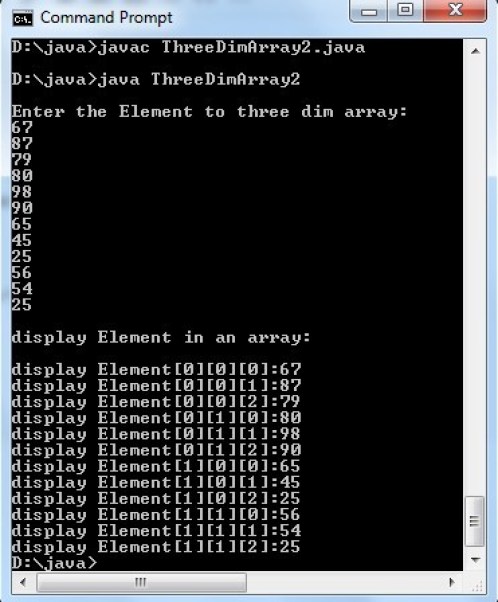
When the above program is executed, it produces the following result